


|
|
 In English
 Suomeksi
Example 2.5 - Interfacing with a computer
Thing to learn: transferring information between your microcontroller and computer.
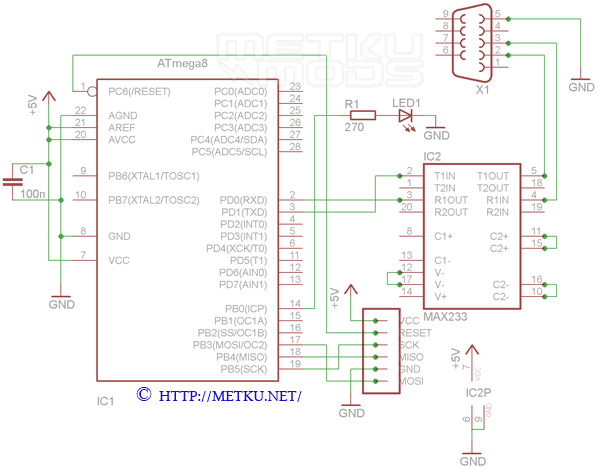
Parts:- ATmega8 or ATmega88 (or any other with a hardware UART, eg. ATtiny2313)
- 100 nF capacitor
- 1 µF electrolytic capacitor
- MAX233 (similar to MAX232 but doesn't need external capacitors)
- Red led
- 270 ohm resistor, current limiting resistor for the led (use LedCalc to calculate the right resistor for different leds)
Example 2.5
Example 2.5
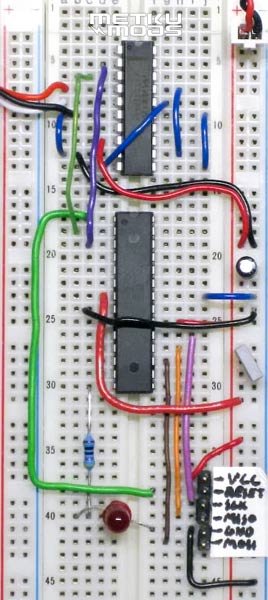
After completing and checking all the connections, connect the device to you computer's serial port or USB to serial adapter. Start up your terminal program, select the correct COM port, set these settings right: baud rate 2400, 8 data bits, 1 stop bit, no parity.
Hit "Connect" and power up your device and if everything went right the device should blink the led couple times and you should see a "Hello" printed on your terminal screen. If not, then check all your settings and connections.
If you send a character A (capital 'A', not 'a'), the led should turn on and text "ON" should appear. Then by sending B the led should turn off and text "OFF" should appear.
/**
* MetkuMods - /
* How to get started with AVR microcontrollers, part 2
* Example 2.5 - Interfacing with a computer
*
* Author: Aki Korhonen
* Date: 2009-04-29
*/

// If clock speed isn't set in the project settings then it is set here
#ifndef F_CPU
	#define F_CPU 1000000UL // 1 MHz
#endif

// Wanted baud rate, 2400 bps is ok with the 1 MHz internal clock
#define BAUD 2400

#include <avr/io.h>
#include <avr/interrupt.h>

#include <inttypes.h>
#include <util/delay.h>
#include <util/setbaud.h>

// General stuff
#define LED1_PIN 0

// Function prototypes
void Init_USART(void);
void USART_SendByte(uint8_t data);
uint8_t USART_ReceiveByte(void);

// Main program
int main(void)
{
	// PB0 out
	DDRB = _BV(LED1_PIN);

	// Set all pins on port B low
	PORTB = 0x00;

	// Initialize UART
	Init_USART();

	// Lets flash the led couple times to show that everything is set
	PORTB |= _BV(LED1_PIN); // Turn LED on
	_delay_ms(100); // Wait 100 ms
	PORTB &= ~(_BV(LED1_PIN)); // Turn LED off
	_delay_ms(100);
	PORTB |= _BV(LED1_PIN);
	_delay_ms(100);
	PORTB &= ~(_BV(LED1_PIN));
	_delay_ms(100);

	// Send a short message to the computer to test out the transmitting
	// You should see "Hello" on the terminal program
	USART_SendByte('H');
	USART_SendByte('e');
	USART_SendByte('l');
	USART_SendByte('l');
	USART_SendByte('o');
	USART_SendByte('\n');

	// Enable global interrupts
	sei();

	while(1)
	{
		// Nothing is done here, all the work is done on interrupts.
		// The loop has to be here anyway to keep the controller running.
	}

	return 0;
}

// RX interrupt, this gets executed when data is coming from the RX line
ISR(USART_RXC_vect)
{
	uint8_t c;

	// Get the byte that is coming
	c = USART_ReceiveByte();

	if(c == 'A')
	{
		// If received byte is same as ascii character A, turn led on
		PORTB |= _BV(LED1_PIN);

		USART_SendByte('O');
		USART_SendByte('N');
		USART_SendByte('\n');
	}
	else if(c == 'B')
	{
		// If received byte is same as ascii character B, turn led off
		PORTB &= ~(_BV(LED1_PIN));

		USART_SendByte('O');
		USART_SendByte('F');
		USART_SendByte('F');
		USART_SendByte('\n');
	}
}

// UART initialization
void Init_USART(void)
{
	UBRRH = UBRRH_VALUE;
	UBRRL = UBRRL_VALUE;

	UCSRA = 0x00;
	UCSRB |= (1 << RXEN); // RXEN, Enable RX
	UCSRB |= (1 << RXCIE); // RXCIE, Enable RX interrupt
	UCSRB |= (1 << TXEN); // TXEN, Enable TX
	UCSRC = 0x86; // 8 Data, 1 Stop, No Parity
}

// SendByte sends the wanted byte to the TX line
void USART_SendByte(uint8_t data)
{
	// Wait if a byte is being transmitted
	loop_until_bit_is_set(UCSRA, UDRE);

	// Send the given data
	UDR = data;
}

// ReceiveByte reads a byte from RX line
uint8_t USART_ReceiveByte(void)
{
	// Wait until a byte has been received
	loop_until_bit_is_set(UCSRA, RXC);

	// Return received data
	return UDR;
}
Conclusion
Hopefully this article gave you some more ideas on how to use microcontrollers. These few examples are just a tip of the iceberg on what can be done with microcontrollers so by combining different features you can use them in countless different applications. Below you can post your questions you might have and suggestions for the next part.
|
Once again, remember to register and post some photos of your creations to AllTheMods (and your other mods too!) See you in part three! |
 Subscribe to Metku.net Subscribe to Metku.net
 Digg It Digg It
 Save This Page Save This Page
 Stumble it! Stumble it!
 Add to Facebook Add to Facebook
|
Related articles in Metku.net
|
|
|
|
|
|
|



 | Pages: 1 2 3 4 5 6 |  |
 Content in english!
 Sisältö suomeksi!
