


|
Index: KT333 Soltek SL-75DRV5 Gigabyte GA-7VRXP Soyo SY-KT333 Dragon Ultra Platinum Benchmarks and Conclusions |
|
SOLTEK SL-75DRV5 |
Specifications
| Processor | - AMD Socket-462 Athlon XP / Athlon / Duron processor |
| Chipset VIA KT333 (VT8367 + VT8233A) | - Features 266/200MHz Front Side Bus settings - 333/266/200MHz Memory Bus - V-Link Hub Architecture, 266MHz link between the North and South Bridge - Supports AGP 4X/2X - PC2700/2100/PC1600 compliant - Supports Ultra ATA-133/100/66 transfer protocol - Provides AC'97 Audio - Support for four USB Ports (max.) |
| Memory | - 3 x 184-pin DDR DIMM - Supports 6 banks up to 3GB DRAMs for Unbuffered DDR SDRAM Module - PC2700/2100/PC1600 compliant |
| On-Board EIDE | - 2 x PCI Bus Master UATA 133/100/66 IDE ports (up to 4 ATAPI Devices) - Supports for PIO Mode 3, 4, UATA 133/100/66 IDE & ATAPI CD-ROM |
| Integrated Super I/O | - 1 x Floppy Port (supports 360K, 720K, 1.2M, 1.44M and 2.88Mbytes) - 2 x serial ports (high-speed 16550A FIFO UART Ports) - 1 x Parallel Port with EEP/ECP/SPP Capabilities - 1 x PS/2 Mouse, 1 x PS/2 Keyboard connectors - 4 x USB Ports (two via optional cable) - 1 x Audio/Game Port |
| Expansion Slots | - 1 x AGP 4X/2X Slot - 5 x 32-bit PCI Bus Master Slots - 1 x CNR (Communication and Networking Riser) - 4 x cooling fan pin header |
| Form Factor | - ATX Form Factor (225mm x 305mm) |
| BIOS | - AWARD Plug-and-Play BIOS |
| Other Features | - Multiplier Setting |
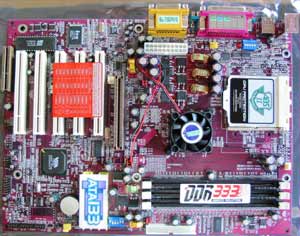
This looks like a typical KT333 board in many ways. AC'97 audio, three DIMM slots and 4 USB slots. I think that there is one major difference though. Soltek has added an ABSII (Anti-Burn Shield II) CPU Protection funtion. This feature, when turned on, will shut down the system if the thermal diode inside the latest AMD Athlon XP CPUs will register temperatures higher than 85°C. Only after the CPU gets cooler you can restart the system. This will effectively protect your CPU against coolers with wrong installation, doesn't have proper thermal paste or material added or the fans that stop for some reason.
Package
Package
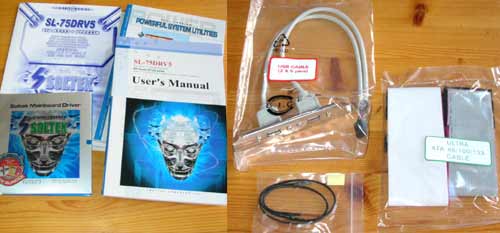
With the motherboard you will receive the following bundle:
- User's manual
- Quick installation quide
- Two CDs with the following software
- Drivers, user's quide and Technical Reference
- PC-cillin 2002 ( Personal firewall and Antivirus )
- Virtual Drive 6 ( CD emulation software)
- PartitionMagic 6.0SE ( Hard drive partition tools )
- Drive Image 4.0 ( Backup software )
- Manual for bundled software
- Ultra ATA 66/100/133 cable
- Floppy drive cable
- USB cable
- Thermal sensor
As you can see the bundle is quite nice. SL-75DRV5 was the only board in this review that included an external temperature sensor. Many find this sensor usefull for monitoring display adater's GPU or other hotspots in one's computer.
Features
Socket
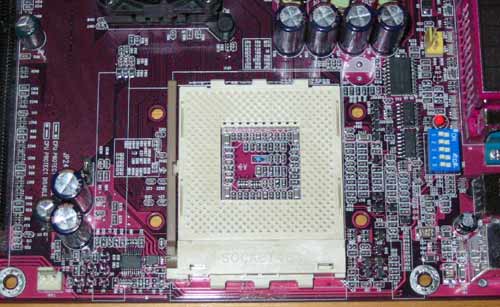
There is plenty of space around CPU socket. Four mounting holes are visible and they are not grounded. At the center you can notice the blue thermal sensor. It sits quite close to the surface of the board so it won't register accurate temperature readings. SL-75DRV5 also support Athlon XP's internal thermal diode. On the SL-75DRV5 there are 4 fan headers and you can see one of them on the right. Blue dip switces are used to select multiplier.
ATX connector
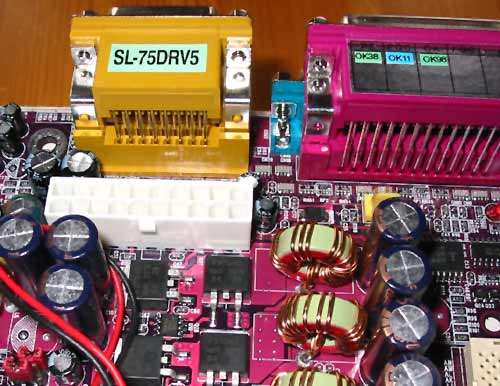
ATX connector is placed behind the gameport. I personally prefer this location and doesn't concider it as a bad designing but for some this could be an issue.
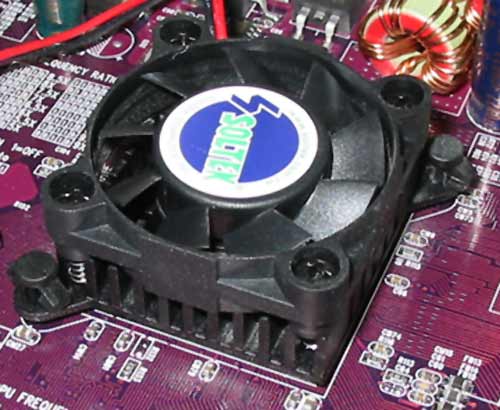
Active cooling
There is a heat sink and fan cooling the North Bridge. Active cooling isn't necessary but when overclocking it gives more stability to the system.
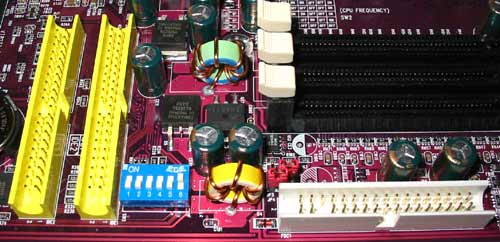
Connectors
Placement of the IDE connectors could be better. The cable is forced to go towards the GFX card. This could be a problem with the longer Ti4600 cards. Blue dip switches are used to select CPU frequency.
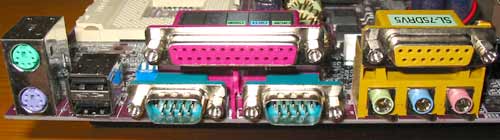
Connectors
The usual connectors that you'll find in almost every board thesedays.
BIOS
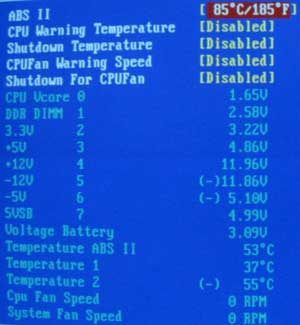
Health monitor
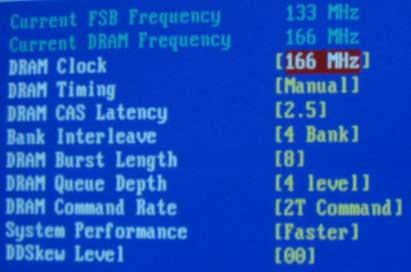
Memory settings
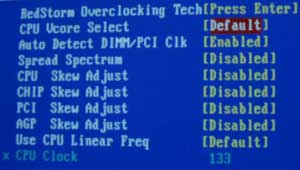
VCore
FSB and VCore are bios adjustable. For DDR and AGP voltages you have to use jumpers.
| << KT333 | Gigabyte GA-7VRXP >> |
 | Pages: 1 2 3 4 5 |  |
 Content in english!
 Sisältö suomeksi!