


|
|

 In English
 Suomeksi
Day One: Hello, My Little Friend
Finally, after one and a half weeks of wait, It arrives. It felt like a damn long wait, but doesn't it always?
You know the buzz in your stomach when you have something new and exciting in your hands, but don't dare to open it, afraid to spoil the moment? I had that. I must've sat with the thing in my lap for five minutes, just staring at the whiteness of the case and blackness of the screen. Courage gathered, I finally got the power on.
Then it strikes me: I'm greeted by an operating system I honestly don't know how to operate. I have three new buttons on my keyboard, one button less on my mouse and something called "Finder" on the screen. Yikes. Mommy?
After the initial panic/despair subsided a bit, I found the Windows equvalent of the Control Panel (which is much straightforward than the Windows' counterpart, mind you) and not long before I had both tap-to-click and two-finger-tap-to-alternate-click enabled. I wonder why tap-to-click is disabled by default; it must be a Mac-thing.
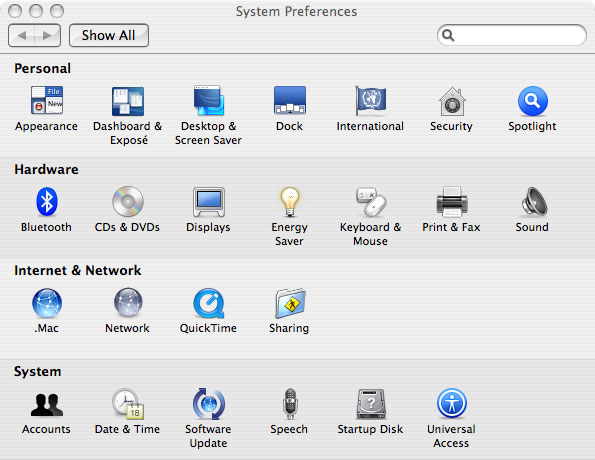
System Preferences window
I'm actually surprised of how fast I get the hang of things. Two-hours-or-so into mucking around and I already have grown accustomed to things. Take for instance installing software: You download your .dmg file, open it and you get usually prompted with a window and a message: "drag this icon to your Applications folder". Do that and, lo and behold, you have installed an application! Why hasn't anyone else thought of that outside the Mac playpen?! That method will perhaps bite itself in the behind somehow, once I've gotten a better hang of things and want to customize more. But why care? I'm too psyched for such trivialities.
Oh, I haven't told about the initial updating process yet. Ok, so I plugged the laptop to the network I was suddenly greeted by this update screen. There were 20-something updates available. So, we're all familiar with this on the Windows world - you install the OS in one hour or less and spend the rest of the day installing updates and drivers, booting every once in a while. Nope, not me, not this time. I pressed the "Download" button, it downloaded a few hundred megs of patches, installed them and quit. Yeah, no reboots, no nothing. I just resumed fooling around while it churned happily away in the background and I continued to fool around once the installation was complete. Yay, I say.
 | Pages: 1 2 3 4 5 6 7 |  |
 Content in english!
 Sisältö suomeksi!