


|
|

 In English
 Suomeksi
Day Three: Virtualificatizationing
I'm feeling more and more at home with this system. I've grown accustomed to its floating-windows apporach (in contrast to Windows' maximized windows), the anti-aliased fonts are something I'm beginning to long for in Windows (ok fine, so you can find an anti-aliasing setting in Windows...), and I'm starting to realize that OS X is indeed the GUI many window managers are trying to mimic, with various success. The KDE-based Kubuntu's System Settings (Control Panel equivalent) has the view arranged in a very similar fashion to OS X, even the "show all"-button at the top is from OS X; Gnome has the 'foot-menu' at the top right corner (OS X has an Apple Menu) and XFCE has also the important top bar thing going on. Don't get me started on Vista. The single thing that I find missing in OS X is a few virtual desktops. With 13" of working area with relatively large fonts, there's only so much area to work on. From what I understand, the next version of OS X, 10.5 or "Leopard", will have them built in.
So, this time it's time for Parallels Desktop, the It when it comes to virtualization on the Mac, apparently (who am I to say, I'm still green). I decided to go for the virtualization instead of a dual boot. I'm always a bit iffy when playing around with dual booting. As long as Murphy haunts us, I'm always taking the safer road. Because Parallels uses individual files as harddrive images, if something goes awry during installation, it doesn't affect anything. As a matter of fact, Parallels both feels and looks very much like VMWare Server, Parallel's recently-gone-free Windows/Linux counterpart. It has, on most parts, the same dialogues, similar (even if a bit less advanced) options and the operation seems very much inspired from VMWare overall.
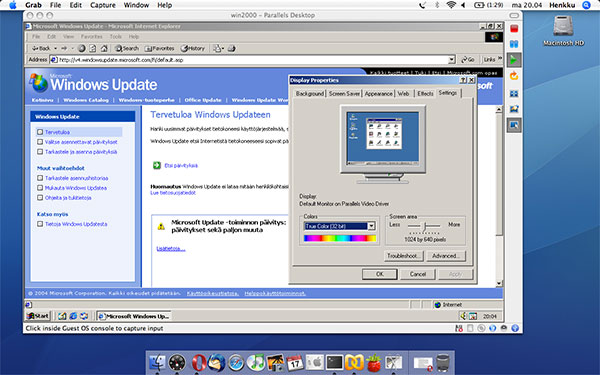
Parallels running Windows 2000 Professional in a window
First I tried with installing Windows 2000 Professional. The installation seemed oddly slow - Parallels slowed the system to a halt a few times, and overall the installer seemed to spend more time thinking than copying files over. I'm pretty sure it's not just because I/O over virtualization would be slower - I mean, how much is there to unpack in a 600MB cd? I didn't time it, but I'm guessing the installation took an hour all-in-all. Then again, it's been a while since I last installed a W2k. Usage is fairly fast with vanilla configurations with 512MB of memory reserved for the virtual system, but after Parallels Tools (various speedup drivers installed on the virtualized Windows - none available for Linux, which is a pity) is installed, it really doesn't feel like it's virtualized at all!
|
Next I installed Kubuntu. Installation was a breeze with the LiveCD. Although its installation wasn't fast either, it felt like a lot faster than the W2k - some 10 minutes in its entirety. When running the system, because of the lack of Parallels Tools for Linux systems, I can definitely feel a lag in responsiveness. It's not annoyingly slow, but just enough to remember that it indeed is virtualized. There are some things I noted when using Parallels on the MacBook. First, you definitely don't want to reserve more memory for the instances than what Parallels recommends as the maximum, if you don't want a system that could be rendered unresponsive. I have 1GB of ram (of which some hundred megs are allocated by the integrated graphics chip) and Parallels recommends a 588MB maximum. Second, you absolutely do not want to use several systems in parallel, especially if both are given a limit of 512MB of ram. |
Third, if you by mistake change the resolution of your guest OS big enough, you are more or less screwed. Kubuntu, for some strange reason, wanted to give me a resolution of about 1600x1200. In windowed mode, that means you can't access the bottom parts of the window, because you can't move the window high enough to access the menus at the bottom. Then again, in full screen mode, the view is cropped to the center, meaning, you can see your cursor flying by, but still no visible bottom toolbar. I'd really like some scroll bars or something if the resolution comes too big. Parallels guys, are you listening? Scrollbars for the guest window, thank you!
As a footnote, apparently VMWare is joining the OSX bandwagon with its own virtualization software. I signed up for the pre-signup for the beta. If VMWare decides to let its software free also for the Mac, I see troubled waters up ahead for Parallels.
 | Pages: 1 2 3 4 5 6 7 |  |
 Content in english!
 Sisältö suomeksi!