


|
|

 In English
 Suomeksi
Closer look
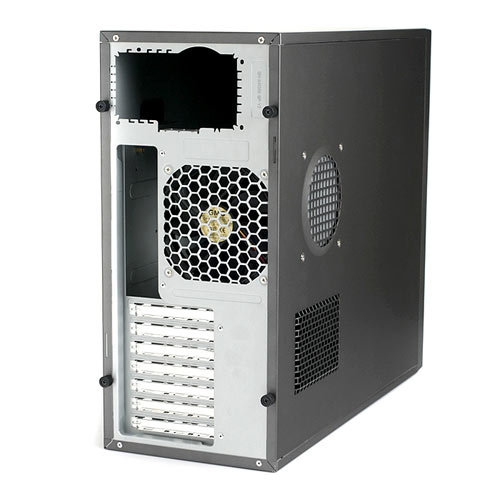
Both side panels are held in place with thumb screws. Also the roof is mounted with screws instead of rivets which is nice if one wants to make a blowhole or something and needs to get it removed. Under the upper thumb screw there's also a place for a pad lock (Retracted in the picture).
There are two large ventilation holes in the side panel, one for the GFX-cards and the upper one to give the CPU cool air. The CPU-duct hole has a dust filter, but the lower mesh does not. The duct is a good thing for the CPU-temperature if it's located over the CPU, but as the motherboard manufacturers don't always put the socket in the same place, the duct isn't always perfectly alligned. If this happens, it may actually just harm the air circulation of the case.
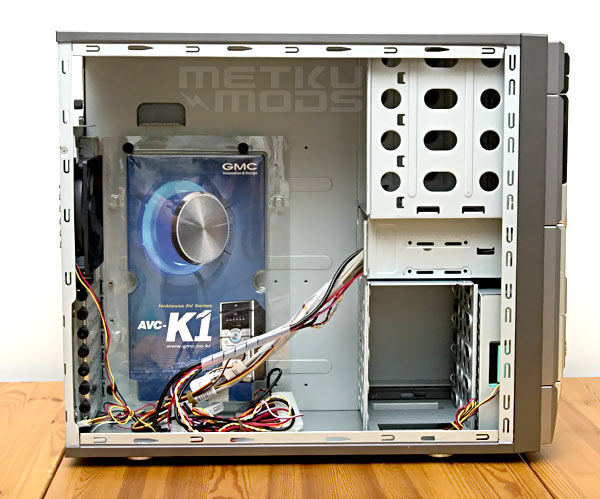
The internal layout is pretty basic with the only special thing being the 90 degrees turned HDD-cage. Everything is made tool less and even the add-on cards are fixed with thumb screws. The packet screwed to the wall contains all the bits'n'pieces needed in the installation. There are four 5,25" slots, two 3,5" "external" slots and four 3,5" places for HDDs. Mounting of the 5,25" and the lowest 4 HDDs is done with plastic rails, but the two "external" 3,5"s in the middle rely on screws. The reason why I call these bays "external" is that even this is the place where you would install a FDD or other 3,5" device, you can't actually do that because there's no holes in the front panel. No floppy disk drive in this case!
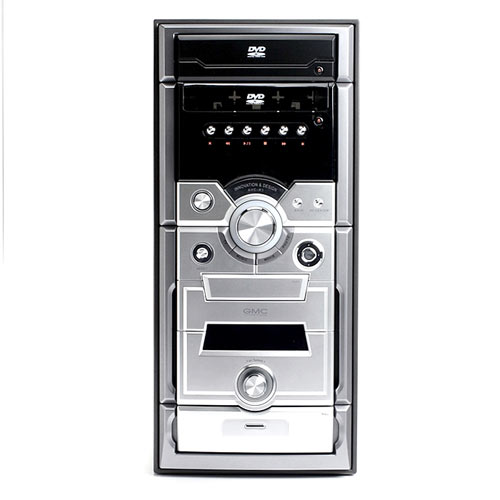
...Which leads us nicely to the front panel itself. First of all I must say I'm sure the looks of this case will split opinions. After testing the two Zalmans HTPC-cases with sturdy aluminum front panels, the plastic one feels kinda cheap. The outlooks reminds me of a mini-hifi series and only thing missing is the cassette deck.
Starting from the top. First there are two stealthed DVD-drive slots. Then buttons to control a media player and a 2*16 VFD-display behind a black acryl window. In the middle of the bezel there's a large volume knob, basic power- and reset buttons and more GMCs special keys. Under that there's a hatch that covers a card reader, then a LCD-display that shows temperature and current fan speed, fan speed controller and last but not least another hatch that hides USB-, FW- and audio connetors.
 | Pages: 1 2 3 4 5 |  |
 Content in english!
 Sisältö suomeksi!