


|
|

 In English
 Suomeksi
Details
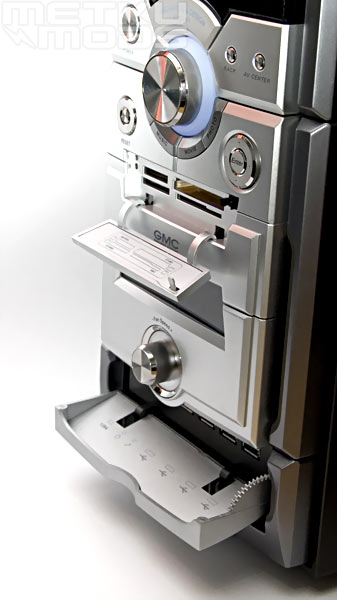
The cover of the card reader opens by pushing the right top corner of it, and the hatch covering the connections on the bottoms open by lightly pulling it from either side. A thing worth noticing in the lower hatch is that the designers on GMC have made a gear mechanism to slow the opening of the hatch a bit. Maybe the manufacturer did read the Zalman HD160-review before designing this case, because in that I pointed out that this kind of mechanism would make the opening more classy.
Installation
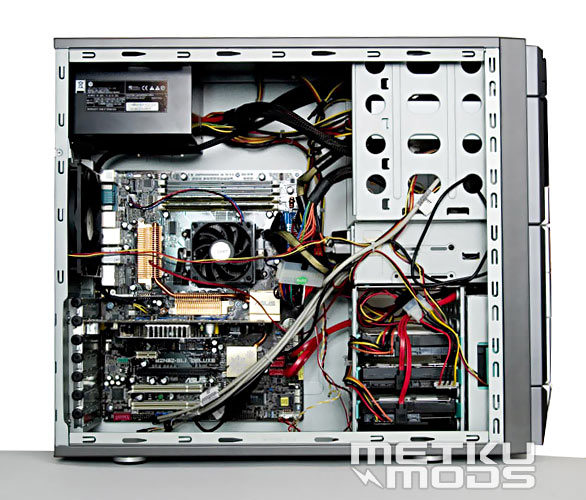
Thanks to the tool less features the installation went very smoothly. The case is a bit deeper than the most basic ones, which leaves a a nice gap between the HDDs and the motherboard. The empty ODD (Optical disk drive)-cages are good places to stuff all the un needed cables of the PSU, but trying to hide all the signal cables made me wonder why GMC hasn't just embedded an USB-hub to the front panel so only one USB-connector would be required. Now the front panel alone takes six USB-connectors: four are just throughputs, but the VFD/IR-receiver and the card reader require their own ones as well.
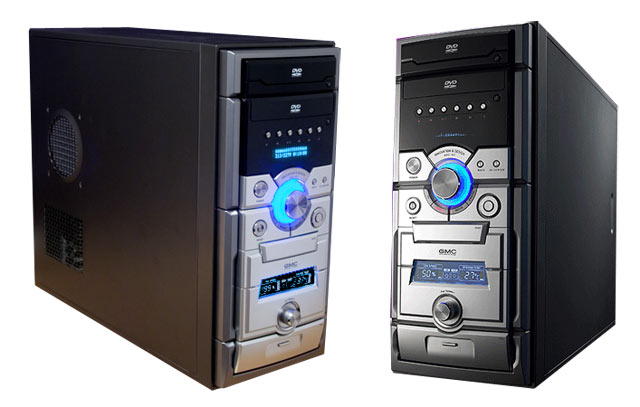
After everything is finally set up, it's time to fire up the rig for the first time. As I suspected, the ring around the volume knob is illuminated by blue leds. Personally I don't like bright lights in PC cases because I sleep in the same room, but using them like this is a better method than just putting them to the front panel when they beam the opposite wall.
Also the fan controller woke up instantly after switching the power on. Fan speed can be adjusted from 50% to full 100% and by pressing the knob you can choose between celsius degrees and fahrenheits on the temperature display. The display is pretty strange as its colors seem to change from green to pink depending on where you watch it. I don't know if this is caused by the backlight or what, but I definitely haven't seen such effect before.
Taking control
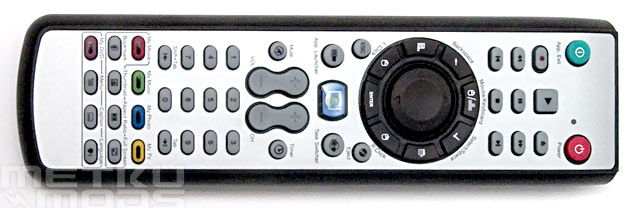
Before we go into the software, lets take a look at the remote controller first.
The most commonly used media buttons are located to the upper part of the remote. On the very top there's App Exit (alt + F4) and a power buttons and under them there's the round area with arrow keys (mouse) in the middle and some necessary function buttons around it. These are select/space, backspace, L click, R click, enter, Windows-button, options button and a mouse/keyboard key.
Under this section, about in the middle of the remote, there's media key which opens your media player of choice. App launcher, task switcher (alt-tab), ESC, eject, mute, volume up/down and channel up/down. To this point the keys are pretty easy to find because of their different sizes and somewhat logical positions, but unfortunately the logical placements ends here. Under the volume-toggle there's a collection of tiny keys. First comes the numpad and then My Movie, My Music, My Photo and My TV keys and some keys to set the aspect ratio and show the video in full screen.
If I'd get to redesign the remote I'd remove the numpad and rearrange the keys so that they would be easier to find in dark. This leads us to the remote's biggest problem. There's no backlight at all. As the remote is ment to be used while watching movies or listening to music, it would be more than nice to see atleast the most commonly used play and pause buttons being backlit.
 | Pages: 1 2 3 4 5 |  |
 Content in english!
 Sisältö suomeksi!