


|
|

 In English
 Suomeksi
Software

Full installation from the supplied CD adds two shortcuts to your desktop. The iMon is a necessity if you want to use the remote and the VFD display. This program also contains an auto-update feature which is launched right after the program is launched for the first time. A working auto-update is a nice thing, because it makes the manufacturer able to add features and fix bugs without the user needing to be active.
The other program that came with the case is iMedian. It's a media launcher very similar to the one that came with the Zalman HD135. First you tell the iMedian where to search for music, movies and pictures and then they are easily accessible. Basicly it's just a more graphical and easier to use with remote than the Windows' own file browser.
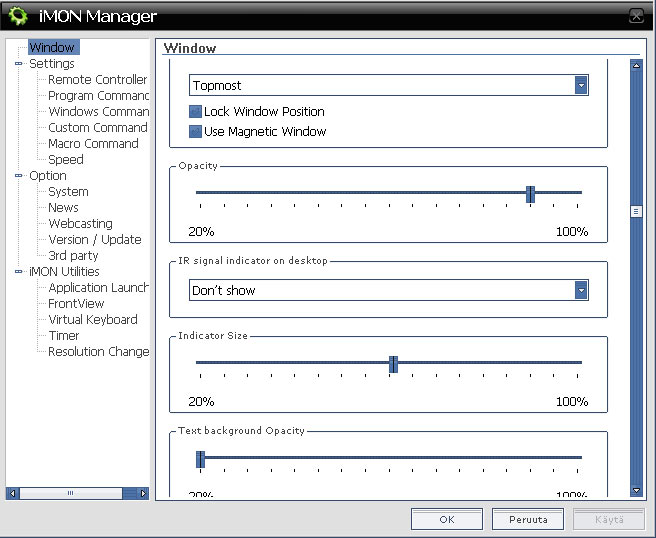
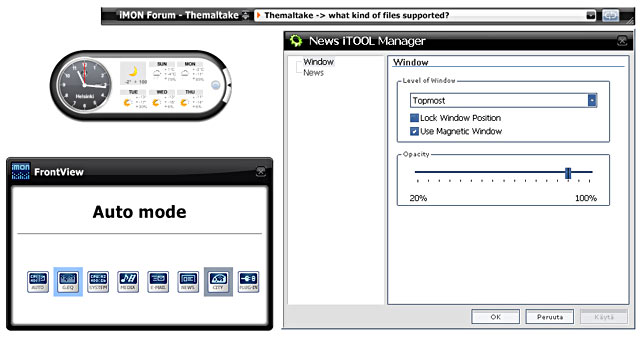
All these menus and settings are parts of iMon. There are two iTools, News iTool which scrolls through recent news and World City iTool which shows a clock and a forecast for a city which you can pick from a list.
iMon utilities contains a set of... well... Utilities, that are mainly ment to be used via remote.
- Application launcher - opens a quick launch menu ( list can be modified from settings)
- Task switcher - similar to alt-tab
- Front view - used to select what to show on the VFD
- Timer - you can set the computer to sleep, alarm, turn off or turn on after a set delay
- Resolution changer - lets you easily change the resolution of the monitor
- Virtual keyboard - opens a virtual keyboard that can be used with the remote
Cooling
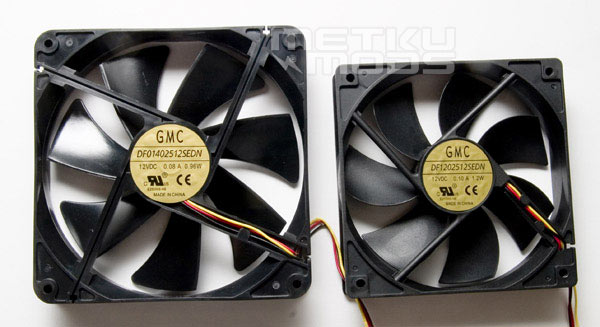
The case comes supplied with two fans. A 120 mm exhaust fan on the rear panel and a 140 mm intake fan on the front panel. These oversized fans are pretty popular these days amongst the manufacturers, and it's easy to say why. The larger the fan, the less RPM it needs to move the same amount of air thus making less noise. In this case the 140 mm monster has lower wattage than the 120 mm one, so maybe they move roughtly the same amount of air. Unfortunately the large fans also have their downsides - if one fails, you most likely will not find a new one from the nearest shop.
There's a dust filter for the intake fan, but unfortunately cleaning it requires removing the front bezel.
The fans that came mounted to the case proved to be well balanced between power and noise, not actually what can be called inaudible, but also not disturbing in any way. The fingerguards aren't too restrictive and everything seems to be ok on that sector. Instead it was the fan controller that caused harm. There's some kind of problem with the controller as when the fan speed is lowered under 96%, the motors of the fans start to make weird noises. This leads to that the fans are actually more silent at full speed than at minium.
 | Pages: 1 2 3 4 5 |  |
 Content in english!
 Sisältö suomeksi!