


|
|

 In English
 Suomeksi
Software
As I mentioned earlier, there is no driver CD in the package but instead an URL from where the latest software can be downloaded. The installation packet is about 44 MB and if you don't have a broad band connection it may sound much. Then again if it helps to lower the price even a bit then I'd say this is the way to go. At least you can be sure you get the latest version unlike on the CD. The mouse is fully functional without the Setpoint software but it adds some features a gamer should not miss.
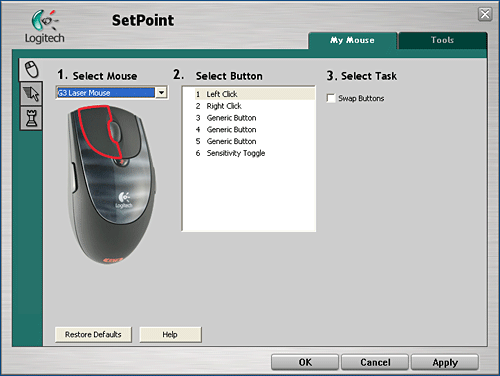
Setpoint
From this basic view you can control the actions each button performs and swap the next- and prev buttons for left handed users, adjust the overall sensitivity and scrolling speed and also add trails to the pointer.
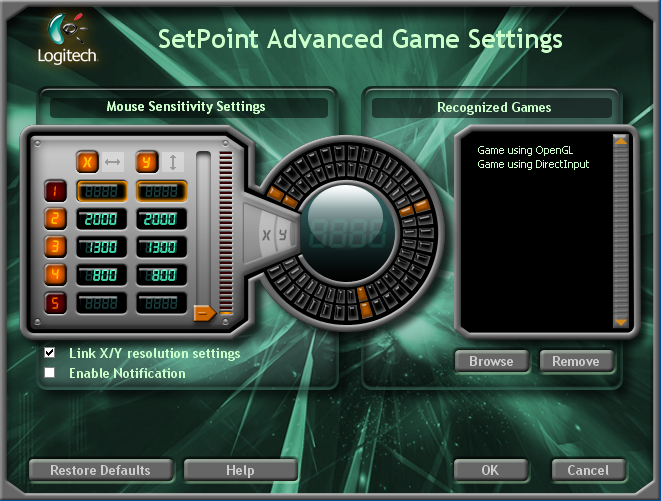
Advanced settings
When you click the "Advanced Game Settings"-menu from the "Mouse Game Settings" sheet, you'll enter to this view. From this rather space age looking control panel you can set the desired sensitivities for the mouse. There's five settings, all of which can be adjusted with 50 dpi steps. For real enhusiasts there is even an option to control both Y and X axis sensitivities invidually. Adjusting the sensitivity is done by only one button on the mouse so it is super easy to use. First the sensitivity goes up and them comes back down. For example on my settings being 800, 1300 and 2000 dpi the circulation would be following: 800 - click - 1300 - click - 2000 - click - 1300 - click - 800 and so on. Having this in mind it would make sense to keep just two different dpis configured.
 | Pages: 1 2 3 4 |  |
 Content in english!
 Sisältö suomeksi!