


|
|
 In English
 Suomeksi
Installation
The case is pretty small and before starting the installation I was afraid there will be some issues with fitting in all the hardware. This time the hardware represents pretty much top of the range in terms of heating so we'll see how the case's cooling performs.
Test setup:| PSU | Silverstonetek SST-ST56F 560W ATX v2.01 | |
| Motherboard | Asus M2N32-SLI Deluxe Wireless Edition | |
| Processor | AMD X2 4600+ | |
| Display adapter | MSI NX6600-VTD256E | |
| Memory | Crucial 2 * 1024MB PC4200 | |
| Hard disks | Seagate 250GB + 200GB | |
| Optical drive | LG DVD-RW |
Quite messy
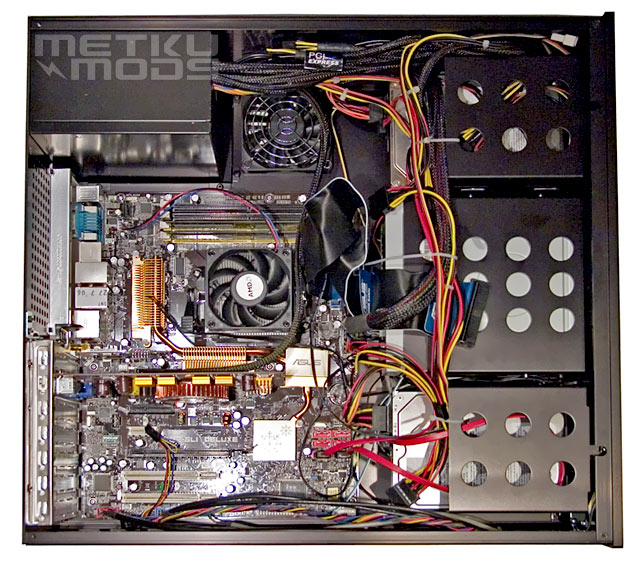
Improved HDD cages and toolless features made this case pretty fast one to assemble. Getting the wires out of sight and way was totally another thing though. Cable managing was maybe the most noticeable reminder of the small size of the case. There's virtually no free space in the case when everything is in place. The first and only problem I faced during the installation was with an IDE hard drive I tried to install under the DVD drive. The drive itself fit perfectly but getting it wired proved to be impossible due to the ATX power connector that was in it's way. There is only one IDE connector in the motherboard of the test rig so the disk had to be left off.
Software
Full installation from the driver CD includes four items. Two items needed for the extras to work at all (drivers and M.Play) and two optional programs some extra functions - SpeedFan and Mediabay. For some reason the main window of the installation also shows the OS and the processor. Providing all the software needed to control the VFD and to use the remote with non-MCE XP is a major step from the Googling we had to do to get the HD160's VFD and remote to work in XP.
M.Play
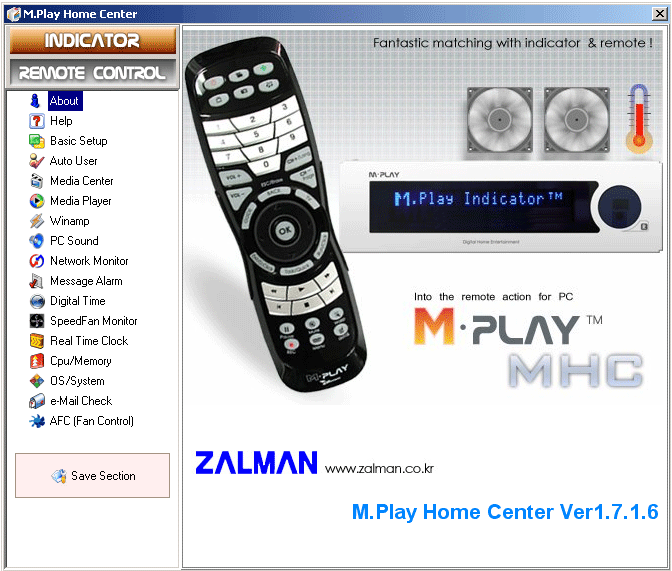
M.Play is a multi purpose program that Zalman promises to work in both normal XP and Media Center Edition. From this program you can decide what to show on the VFD display. It was nice to notice that besides Windows media player M.Play also supports Winamp. You can either custom almost everything or just click on the automated program which shows everything from network usage to new mails. The M.Play can also adjust the RPMs of the case fans either manually or automatically. All together this program proved to be extremely versatile yet easy to use.
By clicking "Remote Control" from the top left, the programs changes to remote's settings. From there the buttons can be customised to work in different way with every program.
M.Play
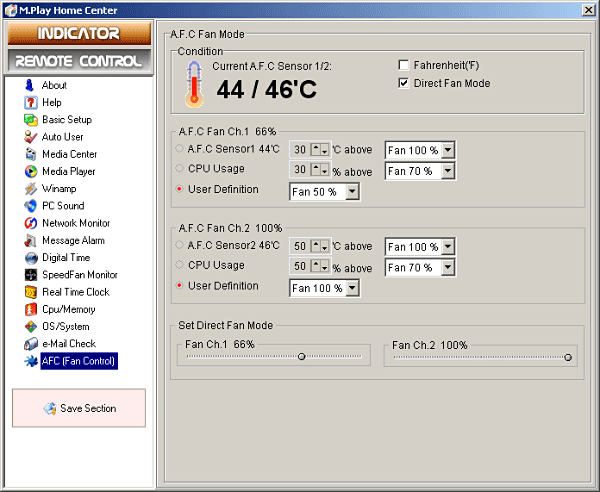
I decided not to go throught every sheet in the M.Play but the A.F.C is worth showing. This is a sheet that shows the temperature readings of the two built in temperature sensors and is also an interface for the fan controllers. As seen in the pics, fans can be either controlled according to the temperature, CPU usage or manually. Manual adjusting can be made in two ways, either roughly with the "User Definition" or with 1% tolerance by the "Set Direct Fan Mode"-setting. When this sheet is chosen, the VFD naturally shows the temperature and fan speed in percents.
 | Pages: 1 2 3 4 5 6 |  |
 Content in english!
 Sisältö suomeksi!