


|
|

Benchmarks
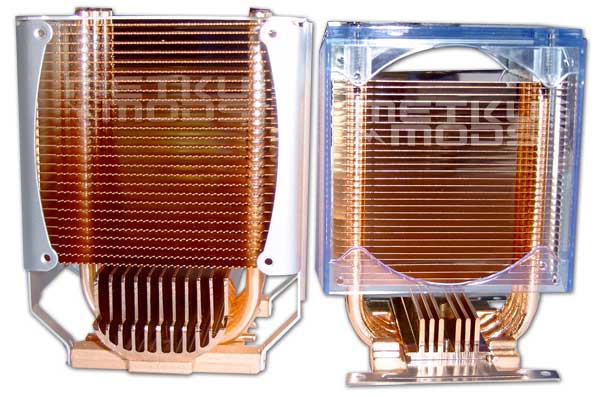
Hyper 6 and HT-101
Aerocool introduced their HT-101 heat pipe cooler a while ago and I thought it would be interesting to place these two head-to-head and see how they perform. The basic idea in both two is the same, six heat pipes in all copper heatsink. Aluminum fan cage on Hyper 6 and plastic one in HT-101. Thing that separates these two is the size in general. Hyper 6 is taller and wider and also weights over two times the weight of HT-101 (456 g). Note; While HT-101 may seem equally tall, its the plastic part that makes the height, not the copper part that counts.
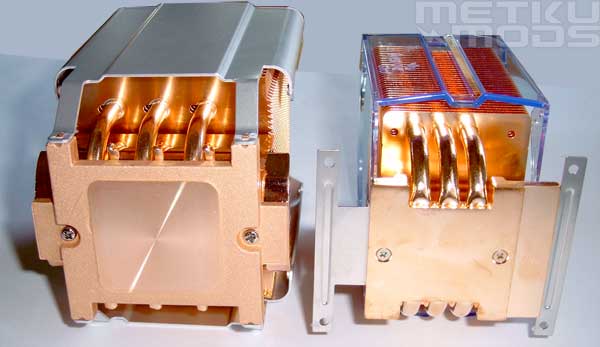
Base
Perhaps the size difference is even more clear in this picture. The base of the Hyper 6 is a lot bigger than in HT-101 and this all should indicate much better cooling power with powerfull CPUs. On the other hand the HT-101 may suit some environments better because of its lighter weight and smaller dimensions. Good to have different designs where to choose from.

Installed
To give you better perspective on how big the Hyper 6 really is I took this picture. Heatsink is as tall as the ATi's 9700pro bundled with Zalmans's ZM80C-HP. Note the perfect lineup with the case fan of Cooler Master's ATC-201b aluminum case. Great way to push out that hot air coming from the heatsink. The case fan was disconnected during the benchmarks so that it wouldn't make unfair advantage to some heatsinks. When this fan is turned on you can expect to get better performance out of all of these coolers but Cooler Master's Hyper 6 and Aerocool's HT-101 will gain the most.
Results
Setup:| CPU | Intel Pentium 4 2.40GHz 800MHz HT @ 2820Mhz |
| Memory | Corsair Twinx-4000 2x512MB |
| HDD | Seagate Barracuda 7200.7 80GB PATA Samsung Spinpoint SV40 40GB PATA |
| GFX | ATi 9700pro |
Side of the case was open during the tests. Temperatures were monitored with Motherboard Monitor 5.3.6.0 and the load was provided by two CpuBurn processes running at the same time. Each stage of the benchmark was carried out by allowing the system to stable the temperature before it was logged. Push and Pull terms are used to indicate whether the fan was pushing air to the heatsink or pulling air through it.
Idle
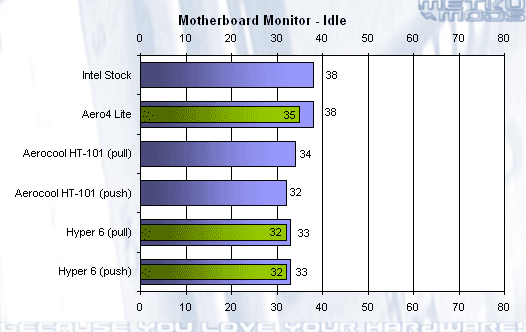
Blue for low/regular speed and Green for highest fan speed setting
Load
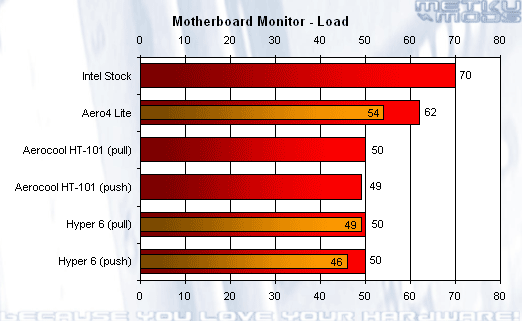
Red for low/regular speed and Orange for highest fan speed setting
What we can learn from these graphs? It is quite clear that both heatsinks that use heat pipes to boost their performance are up to the task to cool down this overclocked CPU. Direction of the fan and the air that it is moving generally seem to affect the temperatures quite little. Also the affect of fan speed seems to be somewhat low. Aero4 Lite is struggling under the load but gets a nice performance boost from maximum speed setting of the fan. On the other hand, at this stage there are nobody willing to stay in the same room with the system. Hyper 6 isn't as loud with maximum setting but it does produce so much noise that I wouldn't like to use it with that setting for a longer period of time when I'm sitting next to the setup.
 | Pages: 1 2 3 4 5 |  |
 Content in english!
 Sisältö suomeksi!
