


|
|

 In English
 Suomeksi
Special features
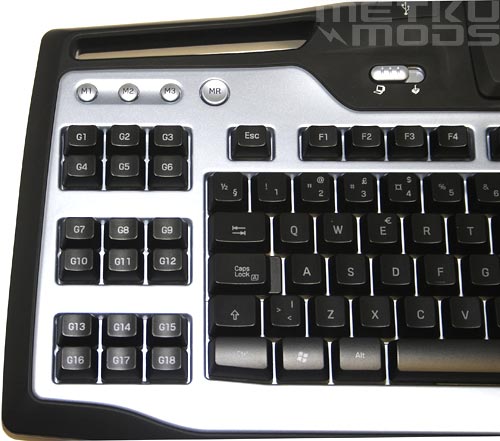
Left hand side
On the left hand side we can find the 18 G-buttons. These are the ones that handle all the macros that you teach to the keyboard. On top of the G-keys are the mode selection buttons; M1, M2 and M3. With these one can increase the macro/function count on each button to three, totalling to 54 different functions. As every G-button can handle multiple regular key presses and combinations, the sky is the limit on what you can do with them.
Next to the mode buttons is the MR button that is used for keyboard controlled macro recording. This button gives you a real control over the G keys as you can record new macros to every key whenever you feel like. More about this feature on the next page.
There is still one special feature that I haven't told you about. Notice that silvery switch on the upper right part of the image? This switch allows one to disable the "windows keys" and set the keyboard to a game mode. No more accidential exits from the game and to the desktop as you happened to press one of the window keys. Great thinking Logitech but why not make the switch appear more like the mode selection or MR button? Well, perhaps this is the time where low tech need meets the low tech solution. :)
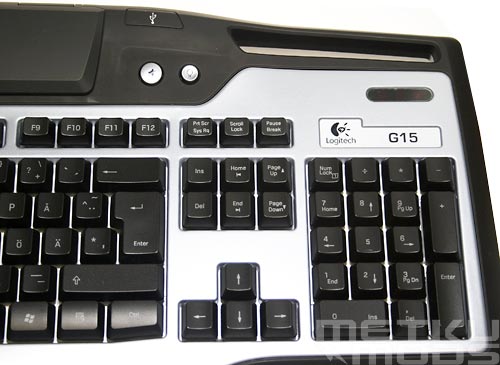
Right hand side
Moving on to the right side of the keyboard we find more special buttons. First there is a mute button to silence all the sounds from the computer. Next to it is a button that handles the backlight intensity on both the LCD and the keyboard itself. Three available settings from off to semi bright and bright.
Some gamers still like to use the right hand side cursor movement keys for gaming (I know I do). Because of this it is great to see the insert key where it has been in the past. Modern keyboards tend to combine the del and ins keys and make them just one big del key. For gamer that limits the amount of buttons in reach so I'm glad to see this kind of "old school" setup on G15.
LCD
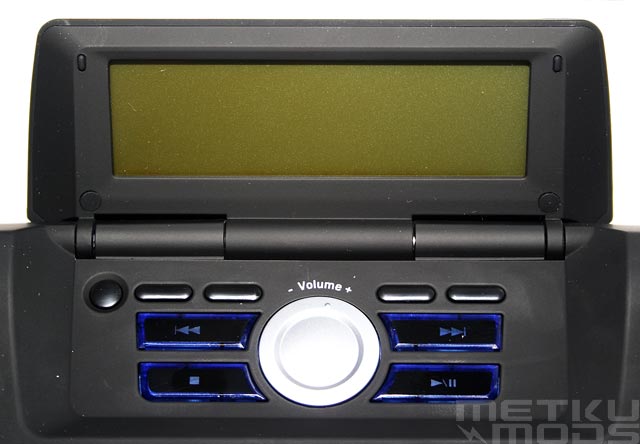
LCD
Like I pointed out in the intro text, extra keys and function buttons are nothing new. LCD on the other hand is bit more innovative. Even more so when made fully user controllable.
Buttons directly below the LCD are so called "soft buttons". They can be used to read user input about the choices that are visible on the LCD screen. For example OK or Cancel some selection etc. Rest of the buttons are for media control. Skip back, skip forward, play, stop etc. Center of all this is a digital volume control wheel.
Different modes


Manufacturer supplied functions
These are some of the functions that you can select to be displayed on the screen. In the marketing material Logitech shows all kinds of game related screens that contain ammo counts etc. but these are not build-in features. For now you get for example a clock and a brief screen about the CPU and RAM usage on your system.
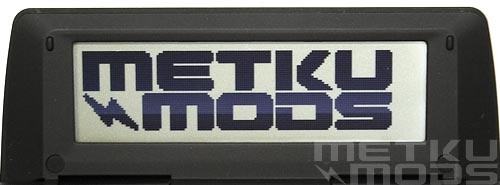
SDK
This little beauty were made with the help of the SDK. I used Microsoft Visual Studio in combination with the SDK to write directly on to the screen. SDK comes with couple of example programs that will get you going but you will need at least an average knowledge on C++ to fully utilize the SDK and the screen. If you think that you don't have the necessary skills needed, don't worry, I'm quite confident that there will be a lot programs and plugins programmed by other users for the G15 in the future. On the other hand, perhaps this is a good time to start learning programming as gaming might not support one in the long term. :)
 | Pages: 1 2 3 4 5 |  |
 Content in english!
 Sisältö suomeksi!