


|
|

BIOS
iBASE chose to use Award's BIOS on MB870. While it looks and feels the same as with regular desktop motherboard, there are some small differences. Lets see what we can find.
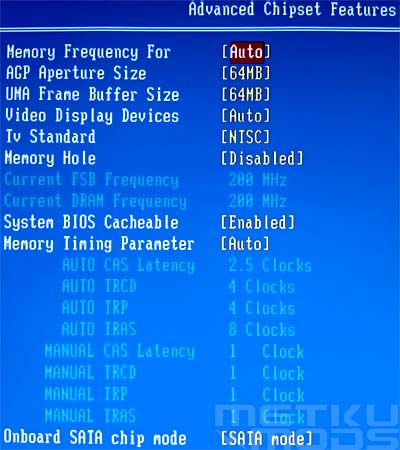
Advanced Chipset Features
This setting dictates how much of system RAM will be used as GFX memory.
Setting are for 32MB, 64MB and 128MB
Auto, CRT Only, LCD Only, TV Only
CRT Force - Other auto, TV Force - Other auto and CRT Force - TV Force
Contains the following options:
NTSC, PAL, PAL-M, PAL-60, NTSC-JAP, PAL-CM, PAL-N and Scart_RGB
Allows the adjustment of CAS Latency, TRCD, TRP and TRAS.
A lot of different display options to choose from. Because the motherboard is primarily targeted for embedded systems it tries to support as many technologies as possible. That is also why you find such an exotic items as LVDS connectors integrated to the MB870. Kiosk, ATM and medical applications will greatly benefit from support and performance that this motherboard has to offer.
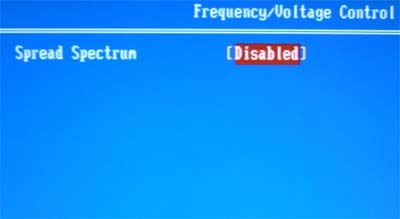
Frequency/Voltage Control
Want to overclock your setup? Not with this board. All things here are operated automatically and BIOS doesn't give any adjustments over the FSB frequency or voltages on different parts of the system. For most users this will not mean much. MB870 is meant to offer the best performance that P4 processor can give but make it all happen inside the specs. Stable and long lifetime for the system is top priority.
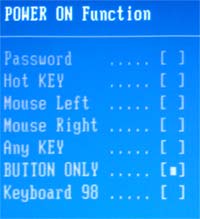
Power ON
For embedded system it might be good to be able to power on the system without direct interface with the power switch. From here the users can pick a preferred way to get the machine started. No need to get on your knees to start up that kiosk booth after this.
 | Pages: 1 2 3 4 5 6 |  |
 Content in english!
 Sisältö suomeksi!