


|
|

 In English
 Suomeksi
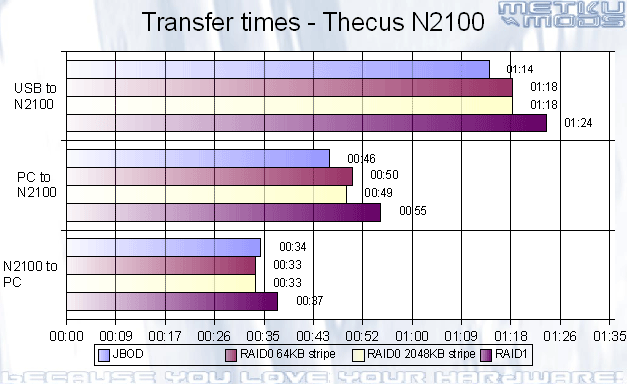
Real life perfomanceSo, how fast is the N2100 in real life scenarios? For this test we used two 160 GB Maxtor Diamondmax SATA2 hard drives. N2100 was hooked up with ABIT AA8 motherboard via 1000 Mb/s HP Procurve 1800-8G switch. Jumbo Frames were enable on all products. Firmware on the N2100 was 2.1.0.1. All tests were done at least three times and times averaged. Timing was done with a stopwatch. As there are theoretical speed gains from using one RAID format over other, we did the tests with both RAID0 and RAID1 and also with the non-raid JBOD. RAID0 was also tested with both 64 KB and 2048 KB Stripe sizes to see if there were any performance differences. |
Results
USB To N2100
For starters we copied a video clip with a size of 737 megabytes to an USB flash memory stick. As the N2100 features a one button copy function from the USB to N2100, we wanted to see how fast the data would be flowing through the USB2.0 connection to the hard drives. Memory stick used was Corsair's ReadOut that we reviewed earlier.
RAID1 was the slowest as expected because it writes all the data to both hard drives. This is what makes the RAID1 the safest setting on N2100. Stripe size didn't matter at all when tested with RAID0. JBOD was a clear winner as only used one hard drive to write the files to.
PC to N2100
Same 737 megabyte video file was then copied via gigabit network from PC to the N2100. Different RAID settings rate more or less the same as with the USB test but the general transfer speed was naturally faster. This test indicates that the maximum writing speed to the N2100 is around 16 Megabytes per second. Greatly over what 100 Megabit network could offer.
N2100 to PC
Again the same file but this time it was copied from the N2100 back to the PC via the same gigabit ethernet network. RAID0 were the fastest although not with as big margin as I would have thought. It seemed that the N2100 were reading first from the other drive and then from the other, indicating that it were not doing the reading simultaneously. Despite that, the reading speed was great; 22,3 Megabytes per second.
Ready for action...
Conclusion

PROS CONS 
"Editor's Choice Award" |
If you want to setup a network archive server easily, N2100 is definitely a product that you should take in on your list of choices. It has the performance to serve even the largest files and with RAID1 it offers safery for your valuable data. Stock it up with two 750 GB drives running either JBOD or RAID0, you have a huge amount of storage space in your disposal. All the content can be shared either inside your private network or to the whole internet community. One can stream video files or music to a XboX, share photos and files with relatives or run a blog. Small companies can use N2100 as a fault tolerant file server or just a temporary dump drive. Possibilities are nearly endless. If you feel that N2100 is too limited because it only offers you RAID1, don't worry. Thecus offers N4100 and N5200 that offer features like RAID 0, 1, 5, 6 and 10, Load balancing, hot swap, eSATA and Active Directory support. On the far side of the spectrum we have N1050 that can house 2.5" hdd and offer for example one button copy that will tranfer all the data from your digital device to the N1050 via USB2.0 port. No computer needed. All in all I really liked this unit. Now I'm pretty confident that my digital photos and other valuable digital content will be in "safe hands". Hard drives have good guarantees these days and you can get a damaged drive replaced easily but what about the content that was on that drive? Perhaps you should take a hard look on what data you are willing to loose when the disk failure strikes. Something that you don't need to think about that much when your bits and bytes are automatically mirrored to separate hard drives when using RAID 1 or better. |
 Questions or comments? Visit MetkuMods forum.
Additional Information
|
Past related articles in MetkuModsReviews:
Mods:
|
 | Pages: 1 2 3 4 5 6 7 8 |  |
 Content in english!
 Sisältö suomeksi!