


|
|

Benchmarks - setting up and overclocking results
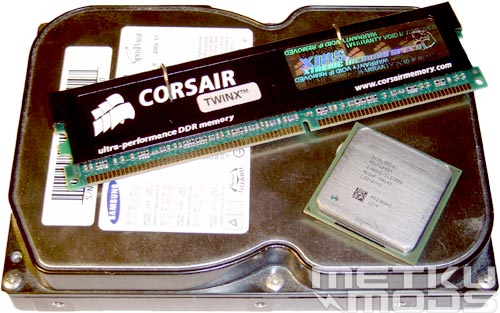
Needed components
This is basically all that we need to make this beast roar. With integrated LAN, display adapter and soundchip the SB62G2 is almost ready to go on its own. You just need to add CPU, hard drive or other media that contains operating system and some memory. Most users will install optical drive and high performance display adapter too but items at the image can be concidered as bare minimum components.
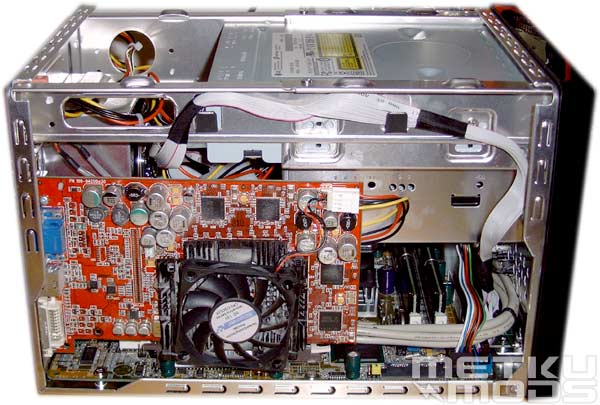
ATi's 9700pro installed
Everything installed and we are ready to start benchmarking. One interesting feature that I already mentioned is the possibility to change memory modules even when you have installed all the hardware. This is sometimes difficult on a regular ATX systems without removing the display adater. Perhaps small can be functional as it is beautiful but this was only a one little detail and doesn't mean that everything is done better than in regular sized systems. I also happened to like those two little hooks that hold the IDE cable, thus making the system more accessible and "clean".
Test setup
Hardware
| Processor | Intel Pentium 4 2.40GHz 800MHz HT |
| RAM | Corsair XMS4000 2x512MB and XMS3200LL 2x256MB |
| Hard Drive | Samsung 40GB 5400rpm |
| Graphics Card | ATi Radeon 9700pro 128MB |
Drivers
| Graphics Driver | Catalyst 3.9 |
| Chipset Driver i865PE/i875P | 5.0.2.1003 |
| DirectX Version | 9.0b |
| OS | Windows XP SP1 |
It is a shame that I only had this old 9700pro card to test the unit. Since I'm not testing the card but comparing system performance with different settings so I think that we can live with it. I tested the unit with two different sets of memory modules to see how it performs with Low Latency and DDR500. All I can say that it performed very well.
Overclocking
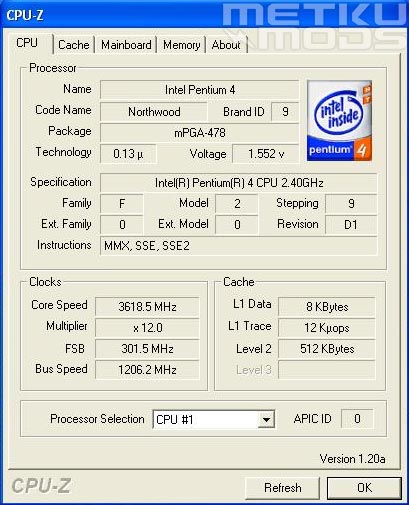
CPU-Z, 301MHz FSB and 3618MHz clock speed
As you can see I managed to get some nice results via overclocking. 301MHz FSB was the highest stable overclock and system got really unstable after this mark. I've been told that this ~300MHz limit could be infact caused by ATi's Radeon card and not the system itself so by tweaking the AGP voltage settings or volt modding the card itself we could have gone even faster. Still, this result proves that this little monster can overclock even higher than most of the competition. This was also my personal best with this P4 2.4C processor and all this was done with SB62G2's regular ICE cooling. Hovering 1218MHz above the regular clock speed gives a nice performance boost on the benchmarks as you can see from the next page.
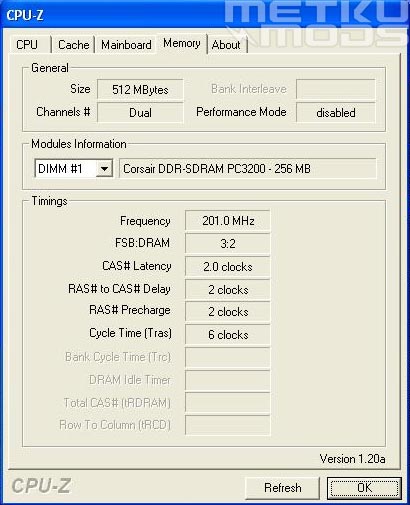
XMS3200LL 2x256MB
301MHz FSB was achieved with XMS3200LL modules. I wasn't able to get the XMS4000 modules to work with 5:4 setting so the benchmarks may not show the best performance of this clock speed. Results are still great but if you manage to get your memory modules to go even faster... ;)
XMS4000 2x512MB
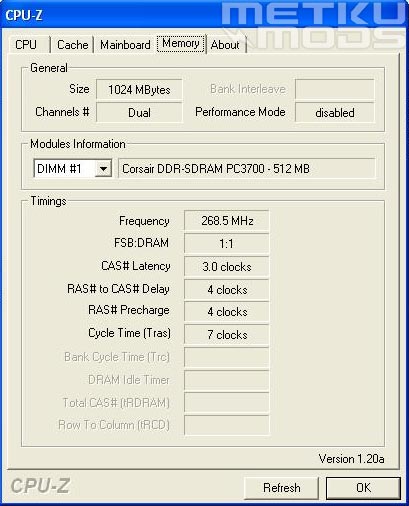
Tests were also done with Corsair's XMS4000 modules running in 1:1 with the CPU. I managed to get 271MHz from them in my initial review and this time they agreed to work with 268MHz. Because the max. DDR voltage from the BIOS is limited to 2.75 volts I wasn't able to push them any further. Most users will be totally happy with this limit but it would be nice to see higher voltage options near three volt mark in the future to allow even more extreme overclocking.
 | Pages: 1 2 3 4 5 6 7 8 |  |
 Content in english!
 Sisältö suomeksi!