


|
|

 In English
 Suomeksi
In detail
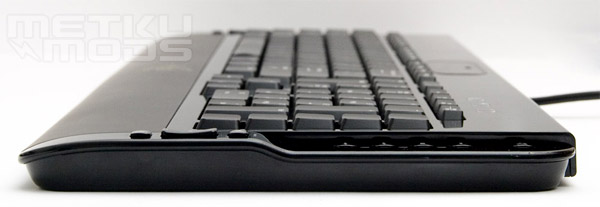
A shot from the side reveals the profile of the keyboard. It's totally flat. With the little feets you can adjust the angle of the board, but only to one way. No fancy ergonomical features here.
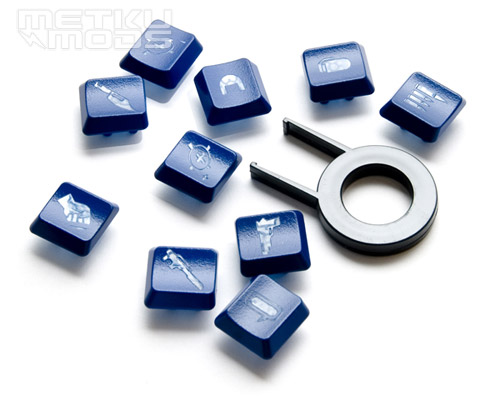
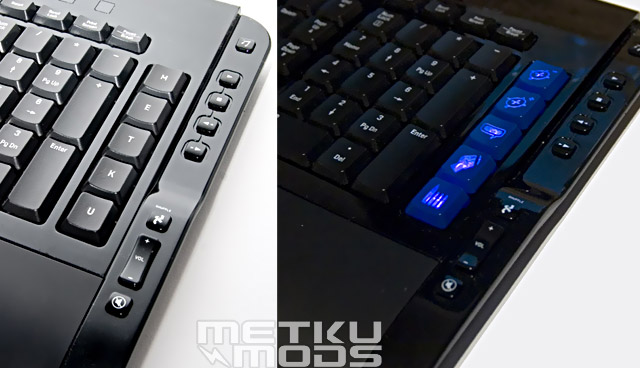
Razer has bundled the keyboard with keys with some custom logos and a tool which makes removing keys easy. These keys are ment to replace the R- and L-keys and they are made from clear plastic that lets the backlight shine through them. All the buttons have similar mounting, so you can switch every key to another one if it just is same sized.
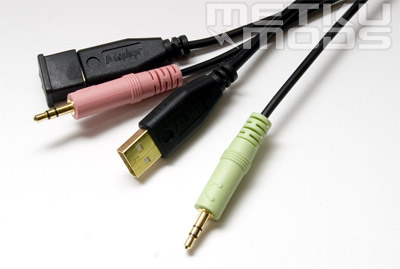
There's four cables you must connect to your computer for the Tarantula to reveal all its functions. First of all there are two 3,5 mm jacks for microphone and headphones. Then there are two USB-connectors covered with caps. I was pretty suprised there were two, but reading the Razerzone.com-site I finally found out that the other connector is just to get extra power fot he USB-hub that's integrated to the board. Two extra USB-connectors are located next to the audio connections to the right top corner. There's what seems to be a standard mini-USB under the Battleedock cover. With an adapter also this one could be used for any purpose.
 | Pages: 1 2 3 4 |  |
 Content in english!
 Sisältö suomeksi!