


|
|

 In English
 Suomeksi
Software
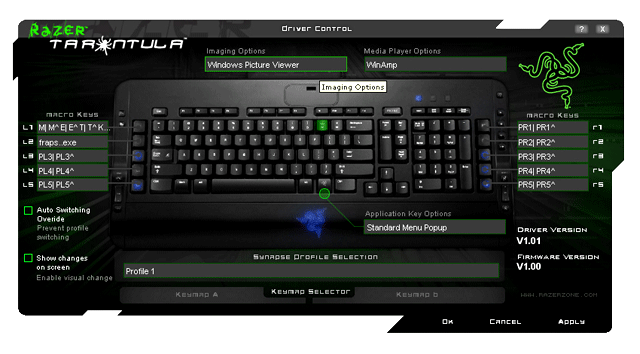
Razer Synapse control panel matches the colours seen in the package. At first sight it looks slightly cluttered, but actually all the neccessary functions are easy to find. First of all there's the Profile Selection drop menu from which you select the profile you want to start tweaking. There are 100 profiles from which five are saved to the onboard memory and so move with the keyboard even if you change it from a computer to another. Under that there's selection for the keymap. Each profile contains two individual keymaps that can be configured, one can customize every button except the one that says Profile. Now here comes the first odd thing: even it says Profile in the button, it actually changes the keymap. This switching is handy as you can keep Keymap A norman and customize the B to fit the needs of the game. Then just pres profile and you can type normally.
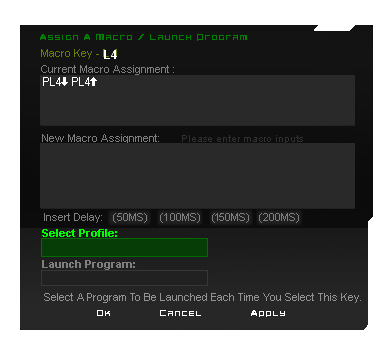
As mentioned earlier, there are ten macro keys in Tarantula. Functions of these are also set from the same control panel, just click the key you want to adjust and another window will open. From this window you first select the Profile and after that give the button combination or software you want. You can also add delays from 50 to 200 ms after each letter which may prove neccessary in some cases. Then Apply and Ok and the key should work. Also the functions of the macro keys can be different between the A and B keymaps.
 | Pages: 1 2 3 4 |  |
 Content in english!
 Sisältö suomeksi!