


|
|

 In English
 Suomeksi
Inside and Out
Things in the outlooks of the Sonata that have stayed the same though all the models so far are the gloss black finish and a black front bezel with a door covering the drives. Adding doors into any case is a certain way to split opinions, some like them because of the outlooks and because they reduce the noise of the optical drives slightly. On the other hand some find them useless and obstructive. Personally I use optical drive so rarely it doesn't really matter wether or not I have to open a door. I also like the sleek outlooks the door allows, so one vote for the doors from me.

The connectors in the front panel are: two USBs, an E-SATA connector and microphone and headphone-jacks. The E-SATA connector hasn't yet been used too widely and I'm not sure if it's a good thing to replace the more familiar firewire connector with it. Both would be nice, but E-SATA only seems a bit odd.
Behind the front bezel there's a dust filter for intake air. The filter can be removed from beneath without removing the bezel. This is a good method if the case is on the edge of a table, but if it's sitting on the floor or in the middle of a table then removing the filter can be difficult.
Internal design

Internal layout hasn't changed noticably since the first Sonata, but why change it if it's good? The HDD-cage is sideways for easy access on it's normal place, PSU is located to the top and the case fan is located under it. Also the support bar that is rather annoying sometimes is still there. Just remember to install the PSU first and it shouldn't cause any problems.
|
|
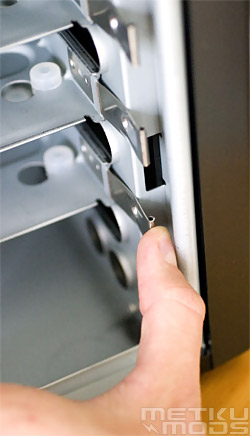
The only problems I noticed with the internal design are with the HDD-cage. Firstly the HDD-sledges are hard to use as the right clip gets so close to the frame one can't easily fit a finger in between. Second, even more serious problem is covered in detail on the last page. |
|
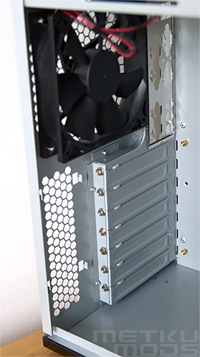
Under the PSU is the only fan in the entire case, a 120 mm Antec Tri-Cool. At minimum-setting the noise is tolerable and at full speed the fan is pretty powerful, so while not the most silent fan on the markets, this is still pretty good compromise. Under the fan, next to the PCI-slots, there's a honey-combed area in the back plate. The purpose of these holes, besides letting dust in to the case, is to supply the graphic card(s) with cool air. If there has to be holes next to the card slots then I reckon this is a better place for them than the side panel, but at least there should be a dust filter covering these holes. |
|
 | Pages: 1 2 3 4 |  |
 Content in english!
 Sisältö suomeksi!