


|
|

 In English
 Suomeksi
In use
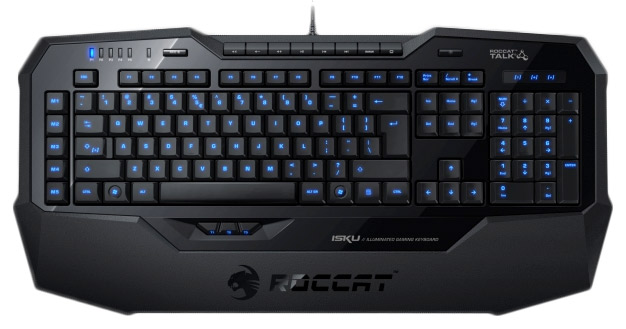
The keyboard was tested in games and in normal use. All in all the usage was trouble-free but when playing Driver: San Francisco I noticed that a certain key combination caused problems with right and left arrow keys. Actually the only way to avoid this kind of problem is to get a keyboard with mechanical switches.
Roccat Talk is an useful and functional feature. For example media keys can be configured to mouse so when you press the keyboard’s EasyShift key (Caps Lock) you can adjust the volume by scrolling the mouse wheel.
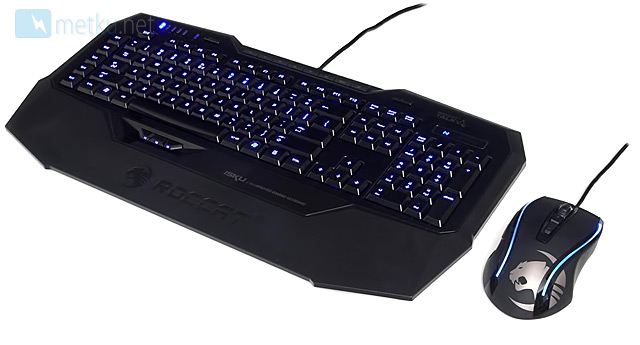
Though this review is about Roccat Isku, Roccat Kone(+) (that is reviewed before) was also in use so that Roccat Talk could have been tested. During the test I noticed a big problem with the mouse’s scroll. When scrolling down the mouse sometimes registered one or two clicks to the other direction. Roccat published new driver and firmware (V1.49 / FW1.45) that was supposed to fix the scrolling problem. However the problem is in the hardware so the problem won’t disappear only by software update. New drivers helped a bit but finally the problem was so irritating that it was impossible to use the scroll anymore. I simply couldn’t use Kone(+) anymore.
Conclusion
Roccat Isku is a good choice for gamers. There are a lot of macros available so for example for role players Isku would be ideal. Roccat Isku’s price is around 90 € so it’s not a cheap keyboard. For 100 Euros there are several mechanical keyboards available in the market so Isku’s price can be too high for many gamers. If Isku had mechanical switches it would absolutely get Editors Choice award. In theory Roccat Talk is working technique but it works only with Isku and Kone[+]. If Roccat can fix the scroll problem of Kone[+], will Isku and Kone[+] be a good gear for gaming enthusiasts. |

|


Update 01.12.2011
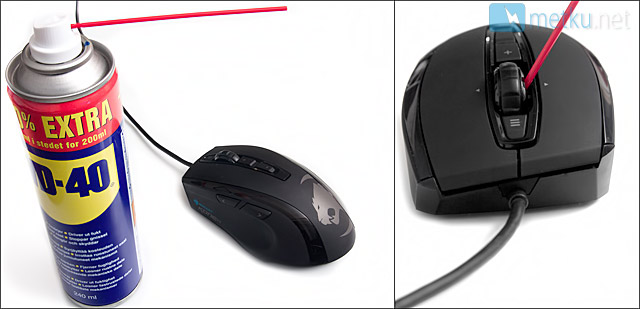
After doing some research about the scroll wheel glitch I noticed that a couple of users fixed the problem by applying
WD-40 to the scroll wheel. I decided to try this myself; I bought a can of WD-40 for 2,50 Euros and sprayed WD-40 to both
sides of the scroll wheel. I plugged the mouse to my computer and voilá, the glitch was gone! I really recommend you to do this if
you’re fighting with this annoying glitch and if you are willing to risk the warranty!
Additional Information |
Past related articles in Metku.net
|




 Content in english!
 Sisältö suomeksi!